EspoCRM has introduced a powerful new feature in version 10.0 – records locking. This feature is designed to improve data integrity and streamline collaboration within teams by controlling who can modify specific records. If you’re managing sensitive or critical information, understanding how to utilize record lock mechanism effectively can make a significant difference.
What Is Record Locking and How Does It Work?
Understanding the Basics
This is a feature that prevents unauthorized or accidental edits to specific records within EspoCRM. When a record is locked, only users with explicit permission can modify or delete it. This ensures that important data remains consistent and free from unintended changes.
Key Benefits of Record Locking
- Protects critical data from accidental alterations.
- Ensures compliance by controlling access to sensitive information.
- Facilitates collaboration by clearly defining who can modify records.
How to Enable and Use Record Locking in EspoCRM
Enabling the Feature
To start using record locking, first ensure you have the necessary permissions (Lock permission). Then, follow these steps:
- Navigate to Administration > Entity Manager.
- Select the desired entity type (either built-in or custom).
- Click Edit and check the Lockable parameter.

Once enabled, the record locking feature becomes active for that entity type. You can then lock or unlock individual records directly from their detail view.
Managing Locked Records
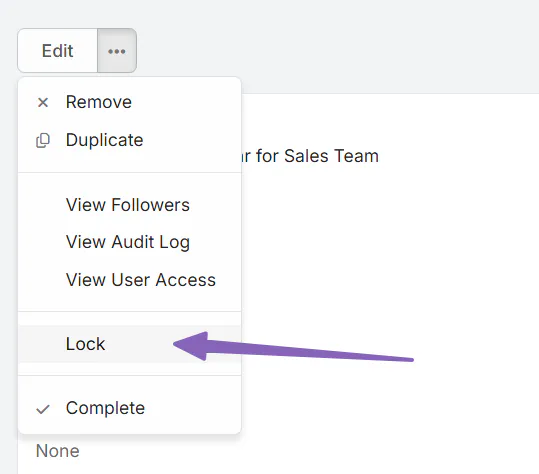
Lock or unlock records: Available from the record’s detail view.
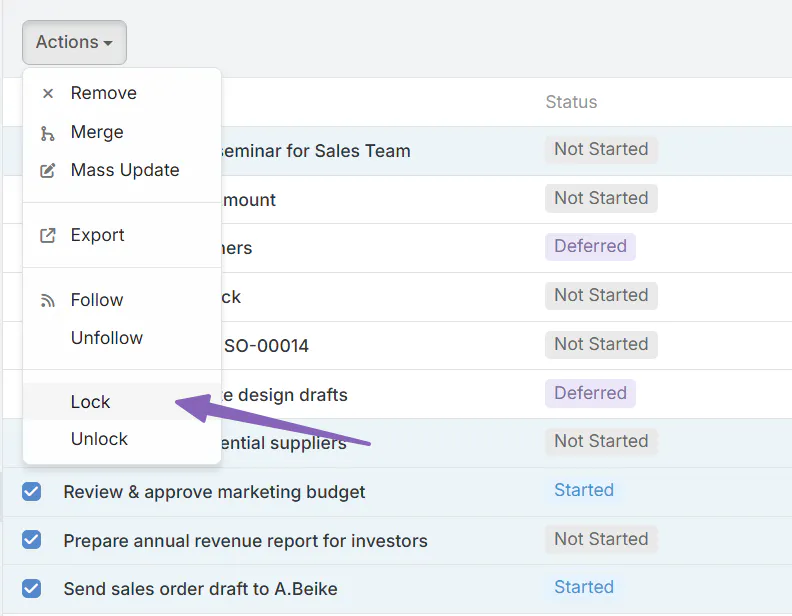
Mass lock/unlock: Use the list view for bulk operations. Just use checkboxes and then Actions dropdown.
Lock indicator: If record is locked, lock indicator will be visible in right-side panel:

Customizing Locking Options
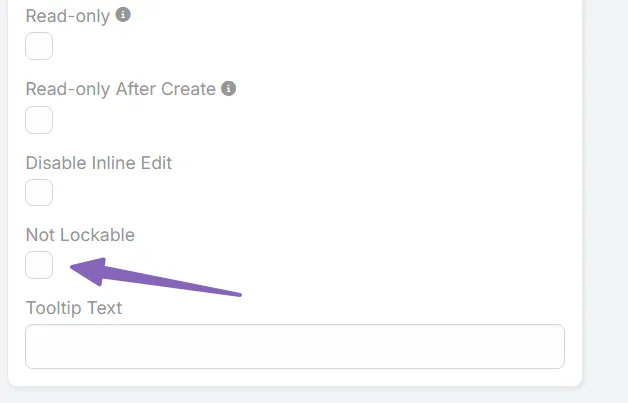
EspoCRM allows you to customize which fields are eligible for locking. For instance, you might want to keep certain fields, such as “Teams,” always editable. To do this:
- Navigate to Administration > Entity Manager.
- Select the entity type and go to Fields.
- Edit the specific field and check Not Lockable.
Why Record Locking Matters for Your Business
In today’s fast-paced business environment, data accuracy and security are more important than ever. EspoCRM’s record locking provides a simple yet effective way to safeguard critical information, prevent unauthorized changes, and maintain consistent data across your organization.
By controlling who can lock and unlock records, your team can collaborate more safely and efficiently. This feature is especially useful in environments where multiple users access the same data, such as sales pipelines, project management, or customer support records.
Final Thoughts
EspoCRM’s record locking feature, introduced in version 10.0, offers a robust solution for data security and integrity. Proper configuration of this feature ensures that your critical records remain protected, while still allowing for flexibility where needed. As you implement this feature, consider your team’s workflow and the importance of each data field to create an optimal locking strategy.
For best results, combine record locking with other EspoCRM security features to establish a comprehensive data governance plan, giving your organization greater control and peace of mind.