In today’s fast-paced business environment, efficient calendar management is crucial for maintaining productivity and collaboration. EspoCRM’s ICS Feed Configuration module offers a powerful solution for importing and synchronizing calendar events from external sources directly into your CRM system. This guide explores how to optimize this feature.
Understanding the Key Features of ICS Feed Configuration in EspoCRM
The ICS Feed module transforms how businesses handle calendar events by automating the import process and ensuring data accuracy. Here are the core features to leverage:
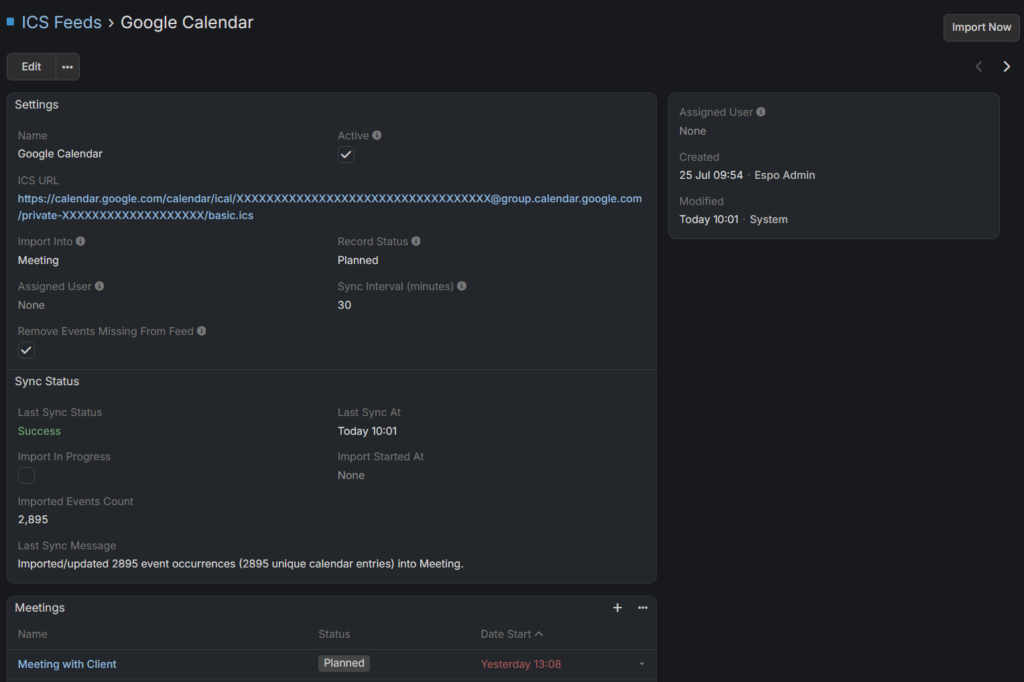
- Import Destination: Specify the entity type such as Meeting, Call, or custom types registered with the “Event” template. Ensure these types include dedicated fields like icsUid for deduplication and icsFeed for linking to the ICS source.
- Assigning Users and Invitations: Assign imported events to specific users, who are automatically added as invitees. This method guarantees that events appear on all relevant users’ calendars, improving visibility and coordination.
- Record Status and Maintenance: Set the initial status of imported records, like “Planned,” to keep calendars organized. Additionally, enable the option to remove events that no longer exist in the source calendar, maintaining data relevance.
- Synchronization Intervals: Define how frequently the system checks for new or updated events with the Sync Interval (minutes). Adjusting this interval balances resource use with calendar freshness.
Optimizing Your ICS Feed Import Process
To get the most out of EspoCRM’s ICS Feed configuration, consider these best practices:
- Regular Syncs: Set appropriate intervals for automatic syncing to keep your calendar data current without overloading the system.
- Use Unique Identifiers: Ensure that your ICS feeds include stable UIDs for each event. This is essential for effective deduplication and avoiding duplicate entries.
- Monitor Sync Status: Regularly review the sync status dashboard to identify issues early. Successful sync reports show the number of imported events and any errors encountered.
- Manual Import Option: When immediate updates are needed, use the “Import Now” feature for manual synchronization.
Conclusion
Integrating external calendar feeds into EspoCRM via the ICS Feed module streamlines scheduling and boosts team coordination. By configuring import options thoughtfully, maintaining regular sync intervals, and leveraging deduplication, businesses can ensure their calendars are always up-to-date and reliable. Start optimizing your calendar management today to improve operational efficiency and collaboration.