In today’s digital workplace, seamless file sharing is crucial for efficient collaboration. Dubas Send’s File Share dashlet offers a simple yet powerful way to share files securely within your organization. This guide walks you through the process of using the File Share dashlet effectively, ensuring your team stays connected and productive.
Step-by-Step Guide to Using the File Share Dashlet in EspoCRM
Uploading and Selecting Files
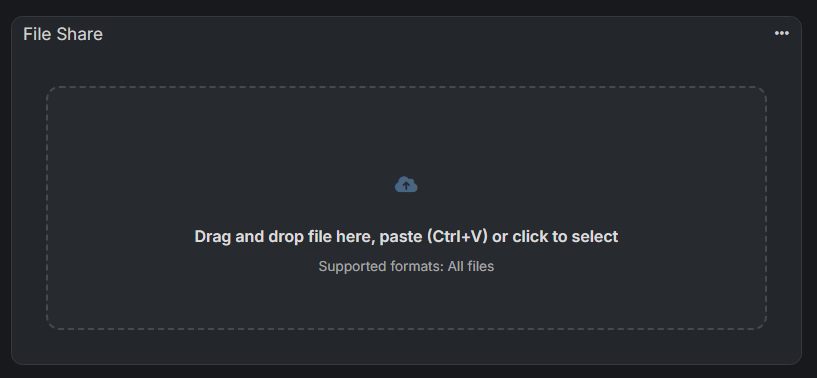
The first step is to upload your file to the dashlet. Upon opening the File Share dashlet, you’ll notice a user-friendly drop zone that prompts:
- Drag and drop files directly from your computer
- Paste files using Ctrl+V
- Click to browse your files
For example, loading an image named image.png is straightforward. Drag the file into the zone or select it via the click option, and it will appear in the dashlet ready for sharing.
Configuring Sharing Settings
Once your file is uploaded, you can customize who has access and for how long. The settings include:
- Valid for: Choose the duration for which the file will be accessible. This can be set from predefined options like 1 Day or Weeks. Adjust based on your sharing needs.
- Maximum Access Count: Limit the number of times the link can be used. A setting of 0 implies unlimited access, perfect for ongoing sharing. Even if you set unlimited access, it’ll expire after period you set in valid for param.
Adjust these settings to control the security and usability of shared files, catering to different collaboration scenarios.
Sharing the File
After customizing your sharing preferences, click the Share button. A confirmation message like “File has been shared!” appears, along with a generated sharing URL. Link can be copied easily by clicking the Copy button. Share it via email, chat, or your preferred communication platform, giving your colleagues quick access to the file.
Resetting and Sharing Multiple Files
Need to share another file? Simply click the Share another file button. The dashlet resets, ready for a new upload, ensuring a smooth workflow without navigating away from your workspace.
Benefits of Using Dubas Send’s File Share Dashlet for Business
- Streamlines the sharing process for quick and secure file distribution
- Offers customizable access controls and expiration dates for security
- Supports multiple files sharing sessions without hassle
- Enhances team collaboration and productivity
Whether you’re a sales professional, project manager, or part of a technical team, leveraging the File Share dashlet in EspoCRM can significantly improve your document handling efficiency. Embrace this feature to facilitate faster sharing and better control over sensitive files.